 FrogBill
Three ways to make an invoice
Most small businesses in India start with one of these:
- A Word or Excel template. Free and familiar, but you type every total and tax amount yourself, number the bills by hand, and keep the files safe on one computer.
- A free online invoice generator. You fill in a form in the browser and download a PDF, with GST and totals worked out. Good for a few invoices a month. Try the FrogBill free invoice generator: no sign-up needed.
- Invoicing software. Your customers, services and rates are saved once. Invoice numbers run by themselves, invoices go out on WhatsApp, and you can see which ones are still unpaid. This is the better choice once you send invoices every week.
Whichever you use, the steps below are the same. They follow what the GST rules ask a tax invoice to show.
Step 1: Put your business details at the top
Start with your business name, address and phone number, and your logo if you have one. If you are registered for GST, add your GSTIN and call the document a tax invoice.
If you are not registered for GST, don't show or charge GST. Call it a bill or invoice and leave out the GSTIN and the tax lines. Businesses in the GST composition scheme issue a bill of supply instead of a tax invoice.
Step 2: Give it an invoice number and a date
Every invoice needs a number that is unique for the financial year (April to March), in a single running series. The number can use letters, digits, hyphens and slashes, and can be up to 16 characters long.
A simple pattern that works: a short prefix, the financial year and a running number, such as INV/26-27/0001. Never reuse a number, and don't skip numbers; if an invoice is wrong, cancel it or raise a credit note rather than deleting it.
The date is the day you issue the invoice. For services, issue it within 30 days of finishing the work.
Step 3: Add the customer's details
Write the customer's name and billing address. If they are registered for GST (offices, shops, builders and housing societies often are), add their GSTIN. A business customer needs it on your invoice to claim input tax credit, so check it carefully.
If the customer is not registered for GST, a name is usually enough for small bills. Once the taxable value is ₹50,000 or more, the invoice must also show their address and their state with its code.
Step 4: List what you did or sold, line by line
Give each line a clear description, the quantity, the rate and the amount. Clear lines save arguments later: "AC general service, split 1.5 ton, 2 units" says more than "Service charges".
If you are registered for GST, add the code for each line: a SAC code for services and an HSN code for goods. If your yearly turnover is up to ₹5 crore, a 4-digit code is required on invoices to GST-registered customers; above ₹5 crore, use 6 digits on every invoice. Your accountant can confirm the right code and rate for your work.
Step 5: Work out the GST
Add up the lines to get the taxable value, then apply the GST rate:
- CGST and SGST, half the rate each, when you and the customer are in the same state. An 18% rate becomes 9% CGST and 9% SGST.
- IGST, the full rate, when the customer is in another state.
Also show the place of supply (the state name and code, such as Kerala (32)), and say whether tax is payable on reverse charge. For most small service invoices, the answer is no. The rules on place of supply have exceptions, so ask your accountant when a job crosses a state border.
Step 6: Show the total, in figures and in words
Write the taxable value, each tax amount and the total. Add the amount in words, such as "Rupees five thousand seventy-four only"; it makes the total harder to change and is expected on most Indian invoices.
Step 7: Tell the customer how to pay, and by when
An invoice that is easy to pay gets paid sooner. Add:
- Your UPI ID, or better, a UPI QR code the customer can scan with any UPI app.
- Your bank details for a transfer: account name, number and IFSC.
- A due date, such as "on receipt" or "within 15 days".
End with short terms (warranty, what is not covered) and your signature as the authorised signatory.
Step 8: Send it, and follow up
Save the invoice as a PDF and send it the same day. For most customers in India, WhatsApp works better than email: they see it at once and can pay from their phone. Keep a copy of every invoice; GST records must be kept for 72 months (six years) from the due date of the annual return for that year.
Then check which invoices are still unpaid, and send a polite reminder when one passes its due date. This is the step most small businesses skip, and where most money is lost.
A worked example
Suresh runs an electrical contracting business in Thrissur, registered for GST. He rewires a shop in the same town and installs two ceiling fans the owner already bought. His invoice:
| Description | Qty | Rate (₹) | Amount (₹) |
|---|---|---|---|
| Rewiring, ground floor shop (labour) | 1 | 3,500.00 | 3,500.00 |
| Ceiling fan installation (labour) | 2 | 400.00 | 800.00 |
| Taxable value | 4,300.00 | ||
| CGST 9% | 387.00 | ||
| SGST 9% | 387.00 | ||
| Total | 5,074.00 | ||
The shop is in Kerala, like Suresh, so he charges CGST and SGST, not IGST. Had the shop been across the border in Tamil Nadu, the same job would show IGST 18%, ₹774.00. The 18% rate is only an example here; confirm the rate for your own work.
Mistakes to avoid
- Charging GST when you are not registered for it.
- Using IGST for a customer in your own state, or CGST and SGST for one in another state.
- Leaving out the customer's GSTIN, so they can't claim their tax credit and ask you for a new invoice.
- Reusing or skipping invoice numbers, or starting a new series in the middle of the year.
- No due date and no payment details, so the invoice sits unpaid.
Do you need e-invoicing?
Probably not yet. E-invoicing (registering each invoice on the government portal for an IRN and QR code) is required only for businesses whose yearly turnover is above ₹5 crore, and only for invoices to other GST-registered businesses. Most small service businesses are well below that. Check with your accountant if you are close.
Create invoices online with FrogBill
FrogBill does each step above for you. Save your customers and services once; FrogBill numbers each invoice, works out CGST and SGST or IGST per line, writes the amount in words and adds a UPI QR code. Send the invoice on WhatsApp as a link the customer opens on their phone, see when it's paid, and let FrogBill send the payment reminders.
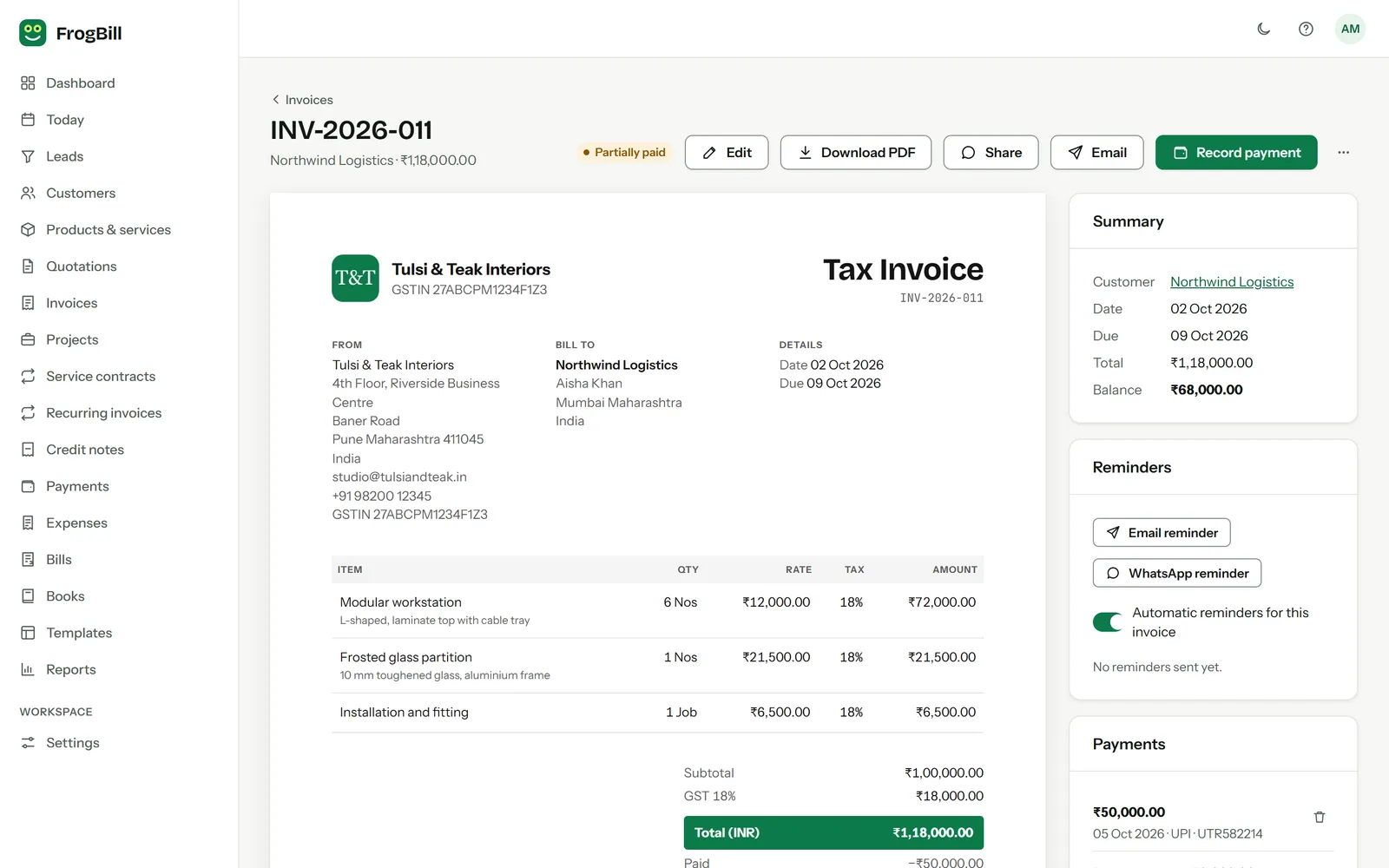
See FrogBill invoicing software and WhatsApp invoicing, or start with a printable AC service bill format. Plans start at ₹99 a month; see pricing.